Right, let’s talk about making your designs work everywhere. The gist of it is this: a responsive design strategy means your website or app automatically adjusts itself to look good and function properly, no matter what device someone is using – phone, tablet, desktop, you name it. It’s not about creating separate versions for each device; it’s about building one flexible version that adapts. This isn’t just a nice-to-have anymore; it’s fundamental to how people experience the internet. If your site doesn’t play nicely on a mobile, you’re losing out, plain and simple.
Before we dive into the technical bits and bobs, it’s crucial to grasp why responsive design is so important. It’s not just a trend; it addresses fundamental user behaviour and business needs. Without a solid understanding of this, your strategy might end up feeling a bit hollow or even misdirected.
User Expectations Have Changed
People expect things to just work. They don’t differentiate between your desktop site and what they see on their phone – it’s all just your brand. If their experience is clunky or requires pinching and zooming, they’re likely to bounce off to a competitor.
- Mobile-First Mentality: For many, the internet is their phone. They might never even see your desktop site.
- Convenience is King: Users want to access information quickly and easily, regardless of their location or device. Frustration equates to abandonment.
- Accessibility for All: Responsive design inherently improves accessibility, making your content available to a wider audience, including those with varying needs or using assistive technologies.
Business Benefits Are Tangible
Beyond user satisfaction, there are concrete business advantages to adopting a robust responsive strategy. Ignoring it can impact your bottom line directly.
- Improved SEO Rankings: Google openly prioritises mobile-friendly websites. If your site isn’t responsive, you’re at a disadvantage in search engine results.
- Wider Audience Reach: You’re not alienating mobile users, which, let’s be honest, is most of the internet now. This translates to more potential customers or readers.
- Reduced Development and Maintenance: One codebase for all devices is significantly easier to manage and update than multiple separate versions. While the initial setup might require thought, the long-term gains are undeniable.
- Higher Conversion Rates: A seamless user experience across devices leads to higher engagement, longer session times, and ultimately, more conversions – whether that’s a sale, a sign-up, or a download.
Responsive design is an essential aspect of modern web development, ensuring that websites provide an optimal viewing experience across a variety of devices. For those looking to enhance their understanding of web technologies, a related article that delves into structured data implementation is available at How to Use Schema with Code Examples: A Comprehensive Guide. This resource offers valuable insights into how schema markup can improve search engine visibility and user engagement, complementing the principles of responsive design by making content more accessible and informative.
Kicking Off with a Mobile-First Approach
This isn’t just a buzzword; it’s a fundamental shift in how you think about design and development. Instead of designing for a large screen and then trying to squeeze it down, you start small and expand.
Why Mobile-First Works
It forces you to prioritise. On a small screen, there’s no room for extraneous fluff. You have to decide what’s truly essential.
- Content and Core Functionality First: What’s the absolute minimum your user needs to achieve their goal? Start there. This usually means your primary navigation, key calls to action, and core content.
- Performance Optimisation: Smaller screens often mean slower connections. Designing mobile-first inherently encourages you to think about page load times, image optimisation, and efficient code.
- Progressive Enhancement: Once you have the mobile experience solid, you can progressively enhance it for larger screens, adding more complex layouts, animations, and additional content that enhances, rather than detracts from, the core experience.
Practical Steps for Mobile-First
How does this translate into your workflow? It’s about a change in mindset from the very beginning of a project.
- Sketching and Wireframing: Start your initial sketches and wireframes on a small canvas. Think about stacking elements, primary navigation, and touch targets.
- Content Strategy: Ruthlessly edit your content for conciseness. What’s the headline? What’s the call to action? What are the key points? The detail can often be progressively revealed on larger screens.
- Design Tokens: Establish design tokens (like colour palettes, typography scales, spacing units) early on. These will ensure consistency across all breakpoints.
Essential Pillars of Responsive Design
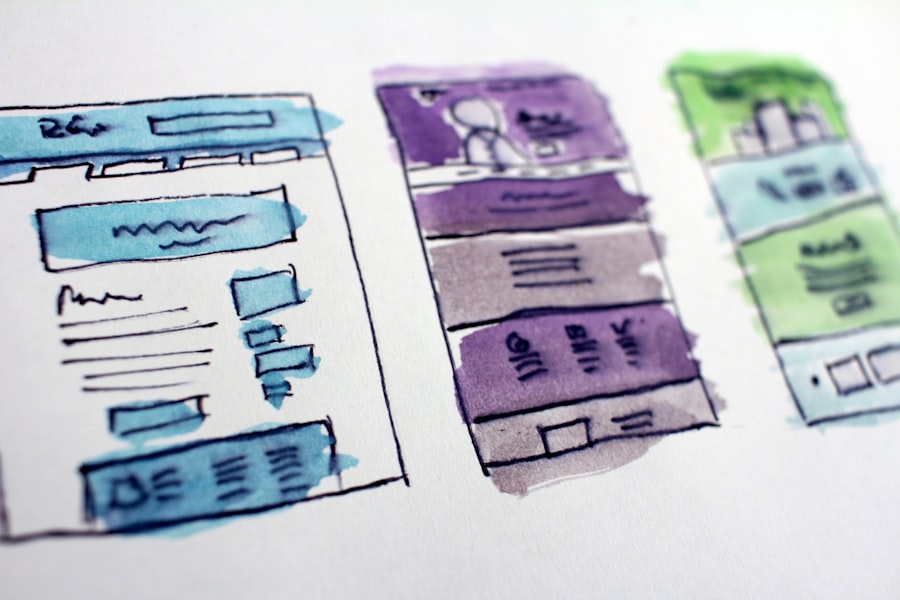
Getting responsive design right isn’t just about media queries. It’s a combination of different techniques and considerations that work together to create a fluid, adaptable experience.
Flexible Grids and Layouts
This is the bedrock. Instead of fixed-pixel widths, you’re working with percentages or other relative units.
- Fluid Grids: Using frameworks like Flexbox or CSS Grid allows you to create layouts that stretch and shrink gracefully. Define columns and rows that adjust automatically.
- Relative Units (Percentages, EMs, REMs, VWs, VHs): Ditch fixed pixel widths where possible. Use percentages for widths and maximum widths for images. Font sizes can be defined in
emorremto scale proportionally. Viewport units (vw,vh) are also excellent for elements that need to scale with the viewport dimensions. max-widthfor Images and Media: A common pitfall is images overflowing their containers. A simpleimg { max-width: 100%; height: auto; }is your best friend here, ensuring images scale down without losing their aspect ratio.
Responsive Images and Media
Images and videos are often the heaviest elements on a page. Serving the right size and resolution is critical for performance and user experience.
srcsetandsizesAttributes: These HTML attributes allow the browser to choose the most appropriate image from a set, based on factors like screen resolution, pixel density, and viewport size. This means phones don’t download gigantic desktop images.- Optimising Video: Consider adaptive streaming solutions for video. For background videos, ensure they’re appropriately compressed and consider only loading them on larger devices.
Media Queries: The Responsive Powerhouse
Media queries are the engine that drives most responsive design. They allow you to apply different CSS rules based on the characteristics of the device accessing your site.
- Breakpoints: These are specific widths (or other characteristics) where your layout or styles change significantly. Don’t just stick to arbitrary device sizes like “tablet” or “phone.” Instead, identify “content breakpoints” – points where your content genuinely needs to reflow or adapt.
min-widthvs.max-width: A mobile-first approach often usesmin-widthmedia queries. You style for the smallest screen first, then add styles that apply from a certain width upwards. For example:@media (min-width: 768px) { ... }.- Other Media Features: Beyond
width, you can query fororientation(portrait/landscape),resolution,hovercapability, and more, allowing for very nuanced adaptations.
Crafting Your Strategy: From Concept to Implementation

Now that we’ve covered the core ingredients, let’s talk about putting it all together into a coherent strategy. This isn’t a one-size-fits-all, but you can adapt these principles.
Define Your Breakpoints Thoughtfully
Don’t just copy someone else’s breakpoints. Your content should dictate where your layout needs to change.
- Content-Out Approach: Start with your content. Where does a line break oddly? Where does a layout become cramped or too stretched? Those are your natural breakpoints.
- Common Breakpoints as Starting Points: While content is king, common breakpoints (e.g., around 480px-600px for phones, 768px-992px for tablets, 1024px-1200px for desktops) can be good starting points, but always adjust to your specific content.
- Testing Across a Range: Ensure your breakpoints cover a wide range of devices and resolutions, not just a select few. The device landscape is incredibly fragmented.
Navigation and Interaction Patterns
How users navigate and interact changes drastically between devices.
- Mobile Navigation Solutions: Hamburger menus, off-canvas navigation, and bottom navigation bars are common on mobile. Ensure your chosen pattern is intuitive and accessible.
- Touch Targets: On touch devices, interactive elements need to be large enough to be easily tapped (typically at least 44×44 CSS pixels).
- Form Inputs: Consider input types (e.g.,
type="email",type="tel") to bring up appropriate keyboards on mobile. Labels should always be associated with inputs for accessibility. - Hover States: Remember that hover states don’t exist on touch devices. Ensure critical information or actions aren’t hidden behind a hover interaction.
Performance Optimisation Across the Board
A slow responsive site isn’t serving anyone. Performance is non-negotiable.
- Minify and Compress Assets: JavaScript, CSS, and HTML should be minified. Images should be compressed and served in modern formats (e.g., WebP).
- Lazy Loading: Implement lazy loading for images and other media that are below the fold. This means they only load when they’re about to enter the viewport.
- Critical CSS: Identify and inline CSS required for the initial render (above-the-fold content) to improve perceived load times. Defer the rest.
- Font Loading Strategies: Optimise custom font loading to prevent Flash of Unstyled Text (FOUT) or Flash of Invisible Text (FOIT).
Responsive design has become an essential aspect of modern web development, ensuring that websites provide an optimal viewing experience across a variety of devices. For those interested in exploring this topic further, a related article discusses the latest trends in web development and how they are shaping the future of responsive design. You can read more about it in this insightful piece on revolutionising the web. Understanding these trends can help developers create more adaptable and user-friendly websites that cater to the needs of their audience.
Testing and Iteration: The Continuous Cycle
“`html
| Aspect | Metric |
|---|---|
| Page Load Time | Under 3 seconds |
| Mobile Compatibility | 100% responsive |
| Media Queries | Implemented for various screen sizes |
| User Experience | Consistent across devices |
“`
Responsive design isn’t a “set it and forget it” endeavour. The digital landscape is constantly evolving, and so too should your strategy.
Device Testing is Non-Negotiable
Simulators and developer tools are great for initial checks, but there’s no substitute for real devices.
- Browser Developer Tools: Most modern browsers have excellent developer tools that allow you to emulate different device viewports, pixel densities, and even network speeds.
- Physical Devices: Test on a range of actual phones, tablets, and desktops (if possible). Borrow from colleagues or use services like BrowserStack or LambdaTest for cross-browser and cross-device testing.
- Accessibility Testing: Ensure your responsive adaptations don’t break accessibility. Use screen readers, keyboard navigation, and check colour contrasts.
User Feedback and Analytics
Your users are your best testers. Pay attention to what they do and say.
- Analytics Data: Look at your bounce rates, conversion rates, and time on page across different devices. Are there specific breakpoints where users are struggling?
- User Testing: Conduct actual user testing sessions, observing people interacting with your site on various devices. This can reveal pain points you might never have considered.
- A/B Testing: Experiment with different responsive patterns or layouts for specific components to see what performs best.
Regular Audits and Maintenance
Technology changes, and so does user behaviour. Don’t let your responsive strategy go stale.
- Performance Audits: Periodically run performance audits using tools like Lighthouse to catch regressions or areas for improvement.
- Code Reviews: Ensure new features or updates maintain responsiveness and don’t introduce new issues.
- Staying Up-to-Date: Keep an eye on new CSS features, browser capabilities, and best practices that can further enhance your responsive strategy.
In essence, crafting a responsive design strategy is about embracing flexibility, starting with the smallest canvas, prioritising performance, and continuously testing and refining. It’s a foundational element of modern web development and a key driver of user satisfaction and business success. Get it right, and your users will thank you for it.